






 Đăng nhập/Đăng ký
Làm ảnh thẻ nền xanh online tại nhà bằng Gemini AI (Không cần ra tiệm)
Hướng dẫn làm ảnh thẻ nền xanh online tại nhà bằng Gemini AI, không cần ra tiệm. Ảnh chuẩn hồ sơ, giữ nguyên khuôn mặt, dễ làm, nhanh chóng, ai cũng thực hiện được.
Nội dung
- 1. Ảnh thẻ nền xanh là gì? Khi nào cần dùng?
- 2. Vì sao nên làm ảnh thẻ nền xanh bằng Gemini AI?
- 3. Chuẩn bị gì trước khi tạo ảnh thẻ nền xanh?
- 4. Hướng dẫn tạo ảnh thẻ phông xanh với Gemini
- Ảnh thẻ dành cho nữ
- Ảnh thẻ dành cho nam
- Ảnh thẻ cho bé gái
- Ảnh thẻ cho bé trai
- 5. Nâng cấp Gemini Pro tại Tổng Kho Phần Mềm
- 6. Kết luận:
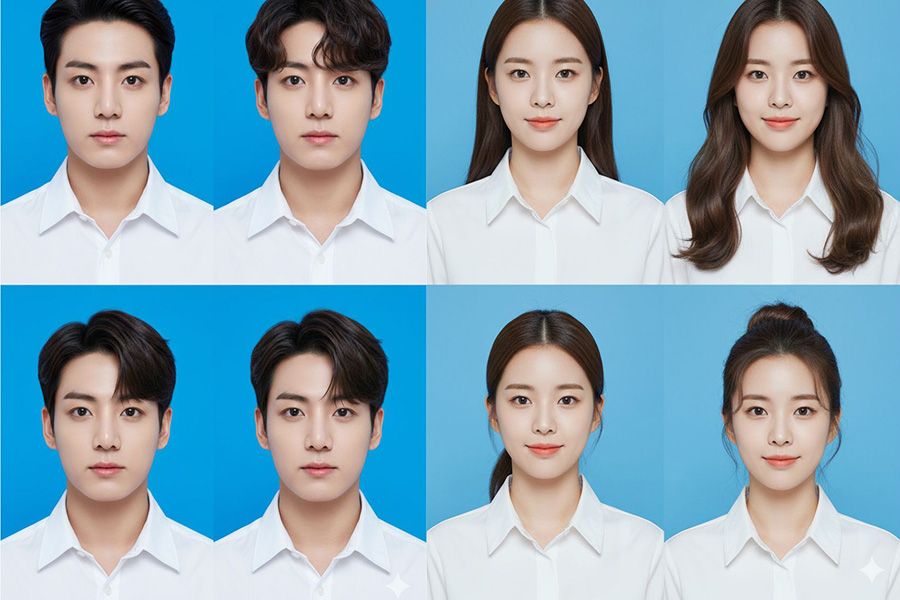
Trong cuộc sống hiện đại, ảnh thẻ nền xanh là một trong những loại ảnh được sử dụng phổ biến nhất cho các mục đích như làm CV xin việc, hồ sơ sinh viên, hồ sơ hành chính, nộp giấy tờ online,… Tuy nhiên, không phải lúc nào chúng ta cũng có thời gian ra tiệm chụp ảnh, xếp hàng chờ chỉnh sửa hay chấp nhận những bức ảnh “cứng”, thiếu tự nhiên chỉ vì cần gấp.
Thực tế, rất nhiều người gặp tình trạng cần ảnh thẻ nền xanh gấp, nhưng lại không có sẵn ảnh đúng chuẩn, hoặc ảnh chụp ở nhà thì nền không đúng màu, ánh sáng không đều, khuôn mặt bị bóng, thiếu chuyên nghiệp. Trước đây, những vấn đề này gần như chỉ có thể giải quyết bằng cách ra tiệm chụp ảnh hoặc nhờ người biết Photoshop chỉnh sửa.
Nhưng hiện nay, với sự phát triển mạnh mẽ của trí tuệ nhân tạo (AI), mọi thứ đã trở nên đơn giản hơn rất nhiều. Chỉ với Gemini AI - công cụ AI đến từ Google, bạn hoàn toàn có thể làm ảnh thẻ nền xanh online ngay tại nhà, không cần ra tiệm, không cần kỹ năng chỉnh ảnh, mà vẫn cho ra kết quả đẹp, tự nhiên và đúng chuẩn hồ sơ.
Trong bài viết này, Tổng Kho Phần Mềm sẽ hướng dẫn bạn từng bước tạo ảnh thẻ nền xanh bằng Gemini AI, kèm theo những mẹo quan trọng giúp ảnh trông thật và chuyên nghiệp hơn, phù hợp cho cả người mới, sinh viên, người đi làm hay bất kỳ ai đang cần ảnh thẻ gấp.
Nâng cấp Gemini Pro bản quyền giá rẻ
1. Ảnh thẻ nền xanh là gì? Khi nào cần dùng?
Ảnh thẻ nền xanh là loại ảnh chân dung có phông nền màu xanh dương hoặc xanh lá, thường được yêu cầu trong các loại hồ sơ như:
-
Hồ sơ xin việc, CV
-
Hồ sơ sinh viên, thẻ học sinh
-
Hồ sơ công chức, viên chức
-
Một số loại hồ sơ hành chính, chứng chỉ
-
Hồ sơ nộp online yêu cầu nền xanh chuẩn
Yêu cầu phổ biến của ảnh thẻ nền xanh:
-
Mặt nhìn thẳng, rõ ngũ quan
-
Ánh sáng đều, không bóng gắt
-
Phông xanh đồng nhất, không loang màu
-
Khuôn mặt chiếm đúng tỷ lệ ảnh
Trước đây, để đáp ứng các yêu cầu này, bạn gần như bắt buộc phải ra tiệm. Nhưng giờ thì không còn cần thiết nữa.
2. Vì sao nên làm ảnh thẻ nền xanh bằng Gemini AI?
Gemini AI (AI của Google) đang được đánh giá rất cao trong khả năng xử lý ảnh chân dung, đặc biệt là:
Ưu điểm nổi bật:
-
Không cần Photoshop, không cần kỹ năng chỉnh ảnh
-
Giữ khuôn mặt thật, không bị “AI hóa” quá đà
-
Tạo nền xanh đều, sạch, đúng chuẩn
-
Thao tác online, làm ngay tại nhà
-
Phù hợp cả người không rành công nghệ
Chỉ cần 1 ảnh chụp rõ mặt, Gemini AI có thể hỗ trợ bạn tạo ảnh thẻ nền xanh nhanh chóng.
3. Chuẩn bị gì trước khi tạo ảnh thẻ nền xanh?
Để Gemini AI xử lý tốt nhất, bạn nên chuẩn bị:
-
1 ảnh chụp chân dung rõ nét (chụp bằng điện thoại là đủ)
-
Ảnh chụp chính diện, không nghiêng mặt
-
Ánh sáng tự nhiên, tránh ngược sáng
-
Phông nền ban đầu càng đơn giản càng tốt
4. Hướng dẫn tạo ảnh thẻ phông xanh với Gemini
Bước 1: Truy cập và chuẩn bị ảnh
Trước tiên, bạn cần truy cập vào công cụ Google Gemini (qua website hoặc ứng dụng di động). Sau đó, chọn mục Tạo hình ảnh.
Một tấm ảnh thẻ đẹp bắt đầu từ một tấm ảnh gốc rõ ràng. Bạn nên chọn ảnh:
Chụp chính diện, mắt nhìn thẳng vào ống kính.
Ánh sáng tản đều trên khuôn mặt, không bị bóng đổ một bên.
Tóc tai gọn gàng, không che khuất trán và tai.
Bước 2: Nhập câu lệnh tạo ảnh thẻ
Ảnh thẻ dành cho nữ
Prompt 1:
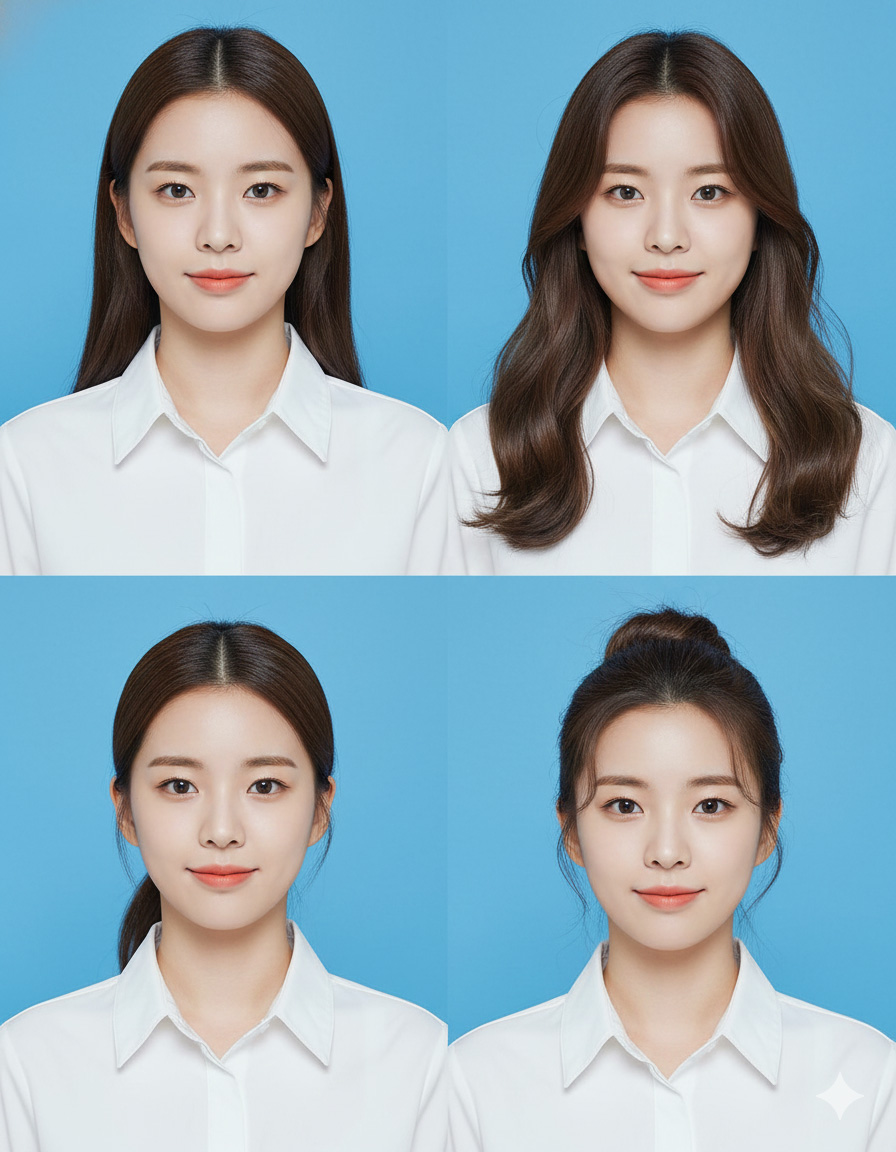
Create a professional ID-style portrait photo of the person [uploaded photo] with different hairstyles, wearing a white button-up shirt with a collar in a 2x2 format. Realistic. The background is a solid bright blue. The photo is centered, clear, and well-lit, resembling a passport or official document photo. Ảnh 8k sắc nét
Prompt 2 – Ảnh thẻ nữ chuẩn hành chính (classic)
Create a professional ID-style portrait photo of the person [uploaded photo], keep the face and facial features 100% unchanged. The subject is wearing a white button-up shirt with a collar, neutral expression, looking straight at the camera. Solid bright blue background, even lighting, centered composition, realistic skin texture, official document style, ultra-detailed 8K quality.
Prompt 3 – Ảnh thẻ nữ công sở hiện đại
Create a realistic professional ID photo from the uploaded image. Preserve the original face perfectly. The subject wears a white collared shirt, neat hairstyle, minimal makeup, confident and natural expression. Bright blue solid background, soft studio lighting, clean and professional look, passport-style photo, 8K resolution.
Prompt 4 – Ảnh thẻ nữ dịu dàng, tự nhiên
Using the uploaded photo, generate a high-quality ID-style portrait. Keep the face 100% accurate. The subject has a gentle, natural expression, light makeup, tidy hairstyle, wearing a white collared shirt. Solid blue background, balanced lighting, centered framing, realistic and sharp 8K image.
Prompt 5 – Ảnh thẻ nữ nghiêm túc, chuẩn hồ sơ nhà nước
Create an official-looking ID photo based on the uploaded image. Maintain all facial features exactly. The subject wears a white button-up shirt, serious and neutral expression, straight posture. Solid bright blue background, uniform lighting, high realism, passport and government document style, ultra-sharp 8K.
Prompt 6 – Ảnh thẻ nữ trẻ trung, sinh viên
Generate a professional ID portrait from the uploaded photo, keeping the face unchanged. The subject appears youthful and fresh, light natural makeup, clean hairstyle, wearing a white collared shirt. Bright blue background, soft natural lighting, centered, realistic, high-detail 8K quality.
Prompt 7 – Ảnh thẻ nữ phong cách studio cao cấp
Create a studio-quality ID-style portrait using the uploaded photo. Preserve facial identity perfectly. The subject wears a white button-up shirt, elegant and composed expression. Solid blue background, professional studio lighting, smooth yet realistic skin texture, official photo style, ultra HD 8K.
Prompt 8 – Ảnh thẻ nữ nhẹ makeup, da thật
Using the uploaded image, create a realistic ID photo. Keep the original face 100%. The subject has minimal makeup, natural skin tone, neat hairstyle, white collared shirt. Solid blue background, evenly lit, no harsh shadows, official document style, crisp 8K resolution.
Prompt 9 – Ảnh thẻ nữ chuẩn CV – LinkedIn
Create a clean and professional ID-style portrait from the uploaded photo. Maintain facial features exactly. The subject wears a white button-up shirt, confident yet neutral expression. Solid bright blue background, soft professional lighting, centered composition, realistic, high-quality 8K image.
Prompt 10 – Ảnh thẻ nữ nền xanh chuẩn visa/hồ sơ quốc tế
Generate a passport-style ID photo using the uploaded image. Keep the face unchanged and realistic. The subject wears a white collared shirt, neutral expression, eyes facing forward. Solid bright blue background, uniform lighting, official international document style, ultra-detailed 8K.
Prompt 11 – Ảnh thẻ nữ chỉnh nhẹ nhưng không “AI hóa”
Create a natural-looking professional ID portrait from the uploaded photo. Preserve the original face completely. The subject wears a white button-up shirt, subtle enhancements only, realistic skin texture. Solid blue background, balanced lighting, centered framing, official photo appearance, sharp 8K quality.
Ảnh thẻ dành cho nam
Prompt 1:
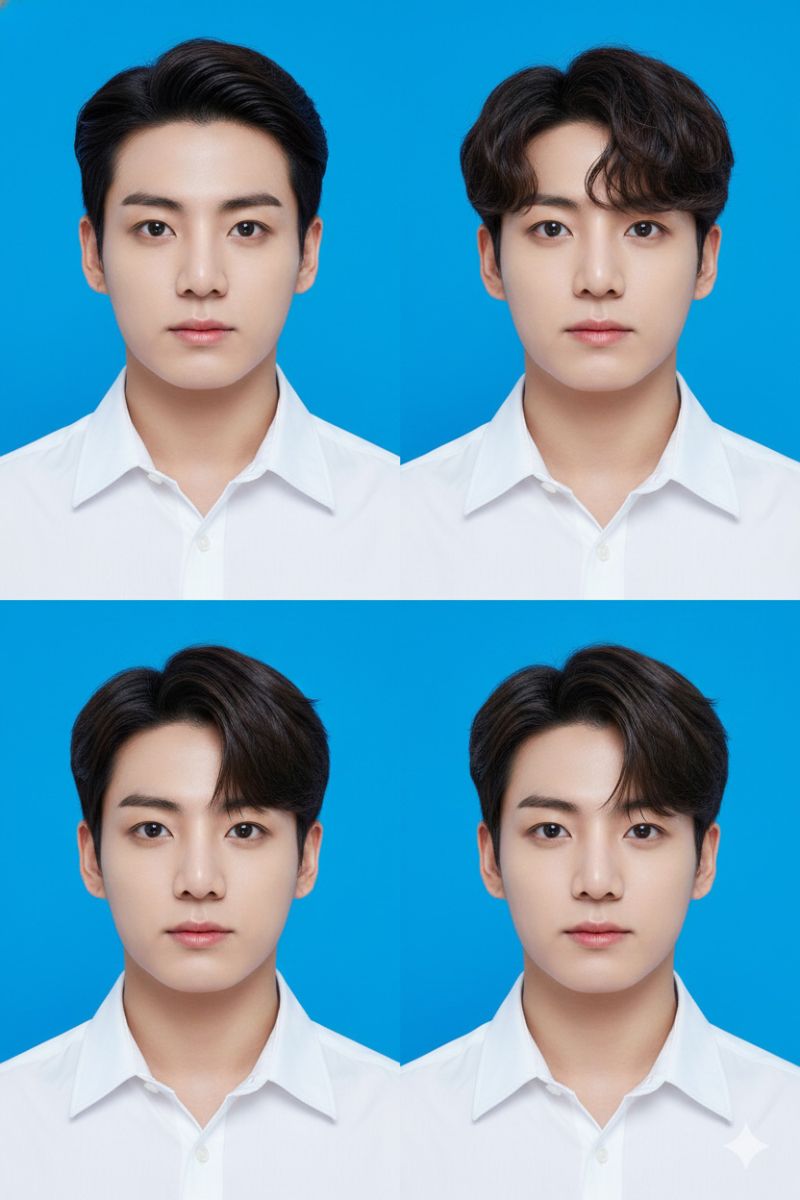
Create a professional ID-style portrait photo of the person [uploaded photo] with different hairstyles, wearing a white button-up shirt with a collar in a 2x2 format. Realistic. The background is a solid bright blue. The photo is centered, clear, and well-lit, resembling a passport or official document photo. Ảnh 8k sắc nét.
Prompt 2 – Ảnh thẻ nam chuẩn hành chính (classic)
Create a professional ID-style portrait photo of the person [uploaded photo]. Keep the face and facial features 100% unchanged. The subject wears a white button-up shirt with a collar, neutral expression, looking straight at the camera. Solid bright blue background, even lighting, centered composition, realistic skin texture, official document style, ultra-sharp 8K quality.
Prompt 3 – Ảnh thẻ nam công sở lịch sự
Using the uploaded photo, generate a realistic professional ID portrait. Preserve the original face completely. The subject has a neat short hairstyle, clean appearance, wearing a white collared shirt. Solid bright blue background, soft studio lighting, centered framing, passport-style photo, high-detail 8K.
Prompt 4 – Ảnh thẻ nam nghiêm túc, hồ sơ nhà nước
Create an official-looking ID photo from the uploaded image. Maintain all facial features exactly. The subject wears a white button-up shirt, serious and neutral expression, straight posture. Solid blue background, uniform lighting, realistic and formal appearance, government document style, ultra HD 8K.
Prompt 5 – Ảnh thẻ nam trẻ trung, sinh viên
Generate a professional ID-style portrait using the uploaded photo. Keep the face unchanged. The subject appears youthful, natural expression, tidy hairstyle, wearing a white collared shirt. Solid bright blue background, soft natural lighting, centered, realistic, sharp 8K image.
Prompt 6 – Ảnh thẻ nam chuẩn CV – xin việc
Create a clean and professional ID portrait from the uploaded photo. Preserve facial identity perfectly. The subject wears a white button-up shirt, calm and confident expression. Solid bright blue background, balanced lighting, centered composition, realistic and high-quality 8K resolution.
Nâng cấp Gemini Pro bản quyền giá rẻ
Prompt 7 – Ảnh thẻ nam phong cách studio cao cấp
Using the uploaded image, create a studio-quality ID-style portrait. Keep the original face exactly the same. The subject wears a white collared shirt, composed and professional expression. Solid blue background, professional studio lighting, realistic skin details, official document look, ultra-detailed 8K.
Prompt 8 – Ảnh thẻ nam tự nhiên, không “AI hóa”
Create a natural-looking professional ID photo based on the uploaded photo. Maintain the face 100% unchanged, no artificial effects. The subject wears a white button-up shirt, neutral expression. Solid bright blue background, even lighting, realistic texture, passport-style photo, sharp 8K quality.
Prompt 9 – Ảnh thẻ nam nền xanh chuẩn visa quốc tế
Generate a passport-style ID photo using the uploaded image. Keep all facial features accurate. The subject wears a white collared shirt, neutral expression, eyes facing forward. Solid bright blue background, uniform lighting, international official document style, ultra-high resolution 8K.
Prompt 10 – Ảnh thẻ nam chỉnh nhẹ da, vẫn rất thật
Create a realistic ID-style portrait from the uploaded photo. Preserve facial structure and identity completely. Apply very subtle skin enhancement only. White button-up shirt, neutral expression. Solid blue background, clean lighting, centered composition, official photo look, crisp 8K.
Prompt 11 – Ảnh thẻ nam chuẩn mọi loại hồ sơ
Create a professional and realistic ID portrait using the uploaded photo. Keep the face unchanged and natural. The subject wears a white collared shirt, calm and serious expression. Solid bright blue background, clear and well-lit, centered, suitable for passport, CV, and official documents, ultra-sharp 8K image.
Ảnh thẻ cho bé gái
Prompt 1
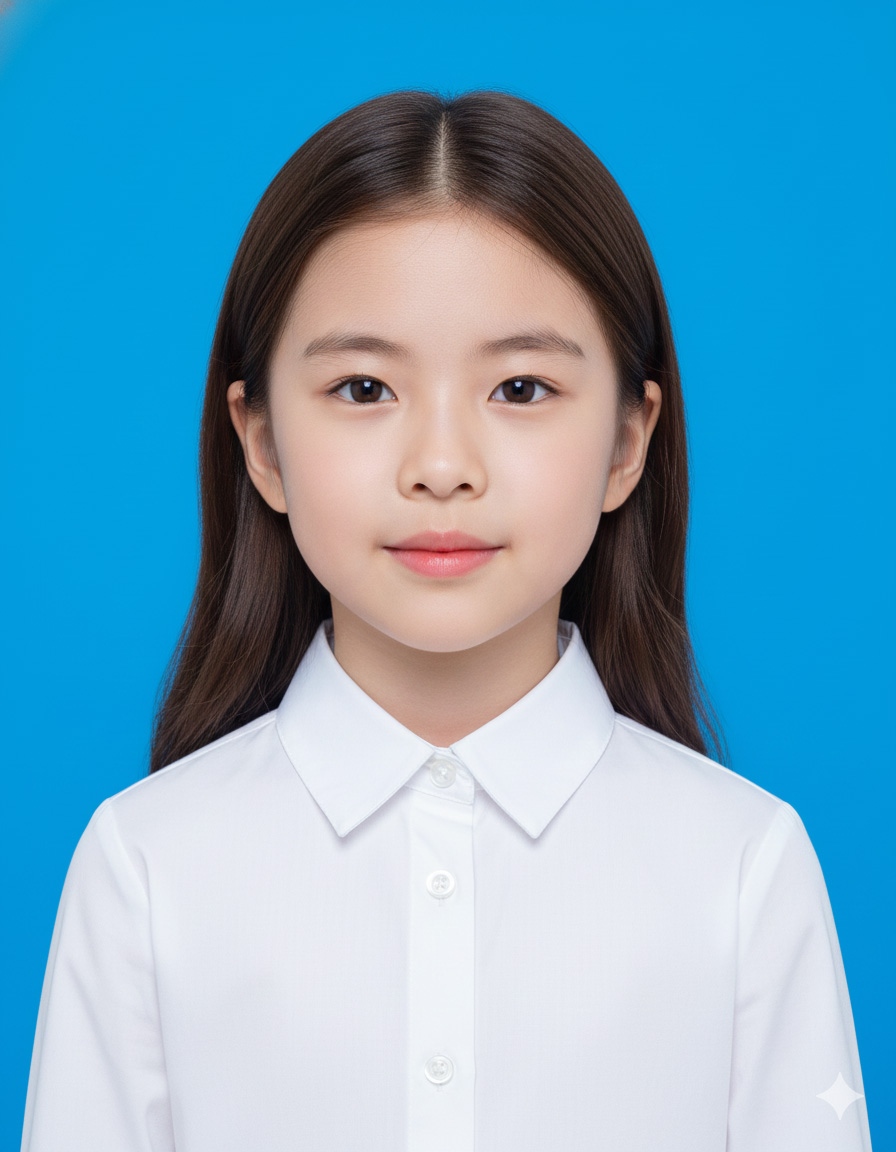
Create a professional ID-style portrait photo of the child [uploaded photo]. Keep the face and all facial features 100% unchanged. The subject is a young girl wearing a white collared shirt, natural and neutral expression. Solid bright blue background, even lighting, centered composition, realistic skin texture, official document style, ultra-sharp 8K quality.
Prompt 2 – Ảnh thẻ bé gái tự nhiên, đúng độ tuổi
Using the uploaded photo, generate a realistic ID portrait. Preserve age, facial proportions, and natural skin texture. No beautification or age alteration. The young girl wears a white button-up shirt with a collar, calm expression. Solid bright blue background, soft lighting, centered framing, passport-style photo, high-detail 8K.
Prompt 3 – Ảnh thẻ bé gái nghiêm túc, dùng cho hồ sơ trường học
Create an official-looking ID photo from the uploaded image. Maintain facial features exactly, no makeup, no filters. The subject is a young girl wearing a white collared shirt, straight posture, neutral expression. Solid blue background, uniform lighting, school and government document style, ultra HD 8K.
Prompt 4 – Ảnh thẻ bé gái hiền, dễ thương nhẹ nhàng
Generate a professional ID-style portrait using the uploaded photo. Keep the face unchanged. The young girl has a gentle and natural expression, neat hairstyle, wearing a white collared shirt. Solid bright blue background, balanced lighting, centered, realistic, sharp 8K image.
Prompt 5 – Ảnh thẻ bé gái dùng cho hộ chiếu
Create a clean and realistic passport-style ID portrait from the uploaded photo. Preserve facial identity and age exactly. The subject wears a white button-up shirt, neutral expression, eyes looking straight forward. Solid blue background, clear lighting, suitable for passport and international documents, high-quality 8K resolution.
Prompt 6 – Ảnh thẻ bé gái phong cách studio nhẹ
Using the uploaded image, create a studio-quality ID-style portrait. Keep the original face, age, and skin texture fully intact. The young girl wears a white collared shirt, relaxed and natural expression. Solid blue background, soft professional lighting, realistic details, official photo style, ultra-detailed 8K.
Prompt 7 – Ảnh thẻ bé gái không chỉnh da, không AI hóa
Create a natural-looking professional ID photo based on the uploaded photo. Maintain the face 100% unchanged, no skin smoothing, no beautification. The child wears a white button-up shirt, neutral expression. Solid bright blue background, even lighting, realistic texture, passport-style photo, sharp 8K quality.
Prompt 8 – Ảnh thẻ bé gái nền xanh chuẩn giấy tờ quốc tế
Generate a passport-style ID photo using the uploaded image. Keep all facial features accurate and age-appropriate. The subject wears a white collared shirt, neutral expression, eyes facing forward. Solid bright blue background, uniform lighting, international official document style, ultra-high resolution 8K.
Prompt 9 – Ảnh thẻ bé gái ánh sáng dịu, dễ nhìn
Create a realistic ID-style portrait from the uploaded photo. Preserve facial structure and age completely. Adjust lighting softly without changing skin texture. White button-up shirt, calm expression. Solid blue background, centered composition, official photo look, crisp 8K.
Ảnh thẻ cho bé trai
Prompt 1
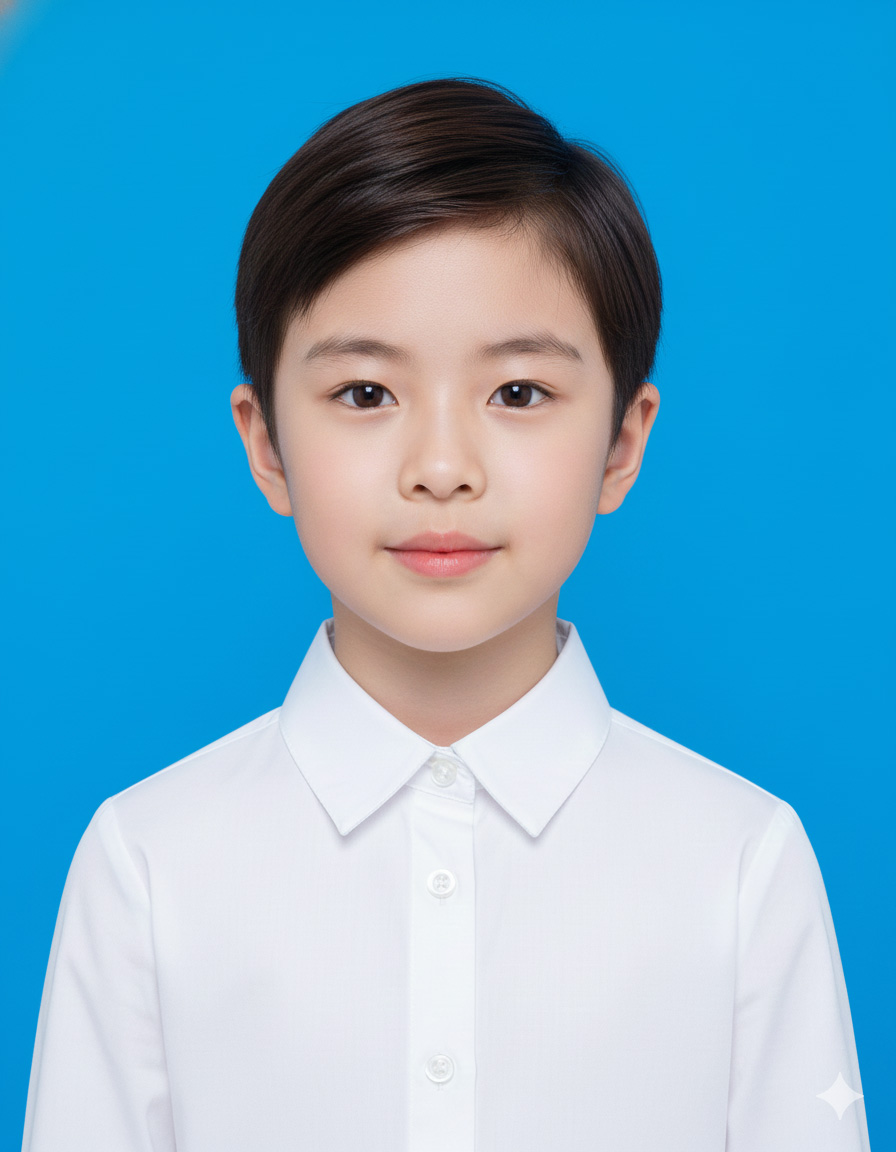
Create a professional ID-style portrait photo of the child [uploaded photo]. Keep the face and all facial features 100% unchanged. The subject is a young boy wearing a white collared shirt, natural and neutral expression. Solid bright blue background, even lighting, centered composition, realistic skin texture, official document style, ultra-sharp 8K quality.
Prompt 2 – Ảnh thẻ bé trai tự nhiên, đúng độ tuổi
Using the uploaded photo, generate a realistic ID portrait. Preserve age, facial proportions, and natural skin texture. No beautification or age alteration. The young boy wears a white button-up shirt with a collar, calm expression. Solid bright blue background, soft lighting, centered framing, passport-style photo, high-detail 8K.
Prompt 3 – Ảnh thẻ bé trai nghiêm túc, dùng cho hồ sơ trường học
Create an official-looking ID photo from the uploaded image. Maintain facial features exactly, no makeup, no filters. The subject is a young boy wearing a white collared shirt, straight posture, neutral expression. Solid blue background, uniform lighting, school and government document style, ultra HD 8K.
Prompt 4 – Ảnh thẻ bé trai hiền, dễ nhìn
Generate a professional ID-style portrait using the uploaded photo. Keep the face unchanged. The young boy has a gentle and natural expression, neat hairstyle, wearing a white collared shirt. Solid bright blue background, balanced lighting, centered, realistic, sharp 8K image.
Prompt 5 – Ảnh thẻ bé trai dùng cho hộ chiếu
Create a clean and realistic passport-style ID portrait from the uploaded photo. Preserve facial identity and age exactly. The subject wears a white button-up shirt, neutral expression, eyes looking straight forward. Solid blue background, clear lighting, suitable for passport and international documents, high-quality 8K resolution.
Prompt 6 – Ảnh thẻ bé trai phong cách studio nhẹ
Using the uploaded image, create a studio-quality ID-style portrait. Keep the original face, age, and skin texture fully intact. The young boy wears a white collared shirt, relaxed and natural expression. Solid blue background, soft professional lighting, realistic details, official photo style, ultra-detailed 8K.
Prompt 7 – Ảnh thẻ bé trai không chỉnh da, không AI hóa
Create a natural-looking professional ID photo based on the uploaded photo. Maintain the face 100% unchanged, no skin smoothing, no beautification. The child wears a white button-up shirt, neutral expression. Solid bright blue background, even lighting, realistic texture, passport-style photo, sharp 8K quality.
Prompt 8 – Ảnh thẻ bé trai nền xanh chuẩn giấy tờ quốc tế
Generate a passport-style ID photo using the uploaded image. Keep all facial features accurate and age-appropriate. The subject wears a white collared shirt, neutral expression, eyes facing forward. Solid bright blue background, uniform lighting, international official document style, ultra-high resolution 8K.
Prompt 9 – Ảnh thẻ bé trai ánh sáng dịu, dễ nhìn
Create a realistic ID-style portrait from the uploaded photo. Preserve facial structure and age completely. Adjust lighting softly without changing skin texture. White button-up shirt, calm expression. Solid blue background, centered composition, official photo look, crisp 8K.
5. Nâng cấp Gemini Pro tại Tổng Kho Phần Mềm
Để quá trình tạo ảnh thẻ nền xanh bằng Gemini AI diễn ra nhanh, ổn định chính xác hơn và không bị giới hạn, bạn nên sử dụng Gemini Pro. Phiên bản nâng cấp giúp Gemini hiểu prompt tốt hơn, xử lý hình ảnh mượt hơn, giữ nguyên khuôn mặt thật, nền xanh đều và hạn chế tối đa tình trạng ảnh bị lỗi hoặc “AI hóa”.
Nâng cấp Gemini Pro bản quyền giá rẻ
Hiện Tổng Kho Phần Mềm đang hỗ trợ nâng cấp Gemini Pro với mức giá hợp lý, kích hoạt nhanh, có hướng dẫn sử dụng chi tiết, phù hợp cho sinh viên, người đi làm và những ai thường xuyên dùng AI cho học tập, công việc hoặc chỉnh ảnh hồ sơ.
Nếu bạn muốn sử dụng Gemini ổn định lâu dài và cho ra ảnh thẻ chuẩn hồ sơ hơn, Gemini Pro là lựa chọn rất đáng cân nhắc.
6. Kết luận:
Với Gemini AI, việc làm ảnh thẻ nền xanh online tại nhà trở nên đơn giản, nhanh chóng và tiết kiệm hơn bao giờ hết. Chỉ cần một bức ảnh chụp rõ mặt và vài thao tác cơ bản, bạn đã có thể tạo ra ảnh thẻ chuẩn hồ sơ, phù hợp cho CV, giấy tờ hành chính hay hộ chiếu mà không cần ra tiệm. Đây là giải pháp tiện lợi, dễ làm và phù hợp cho hầu hết mọi đối tượng.